



This post covers some quick tips, including Q/A and useful links from Day 4 of Google Cloud Architect training covering topics like Storage and Database services: Cloud storage, Cloud SQL, BigTable, Cloud Spanner, etc.
The previous week, In Day 3 session, we covered topics like Cloud IAM, Policies, Resource Hierarchy, Service Accounts, Roles, etc.
So, here are some Q/A’s asked during the Day 4 Live session of Google Professional Cloud Architect from the Storage Services module.
>Storage & Database Services
Google Cloud Platform (GCP) delivers various storage and database service offerings that remove much of the burden of building and managing storage and infrastructure.
>Data Types: Structured & Unstructured Data
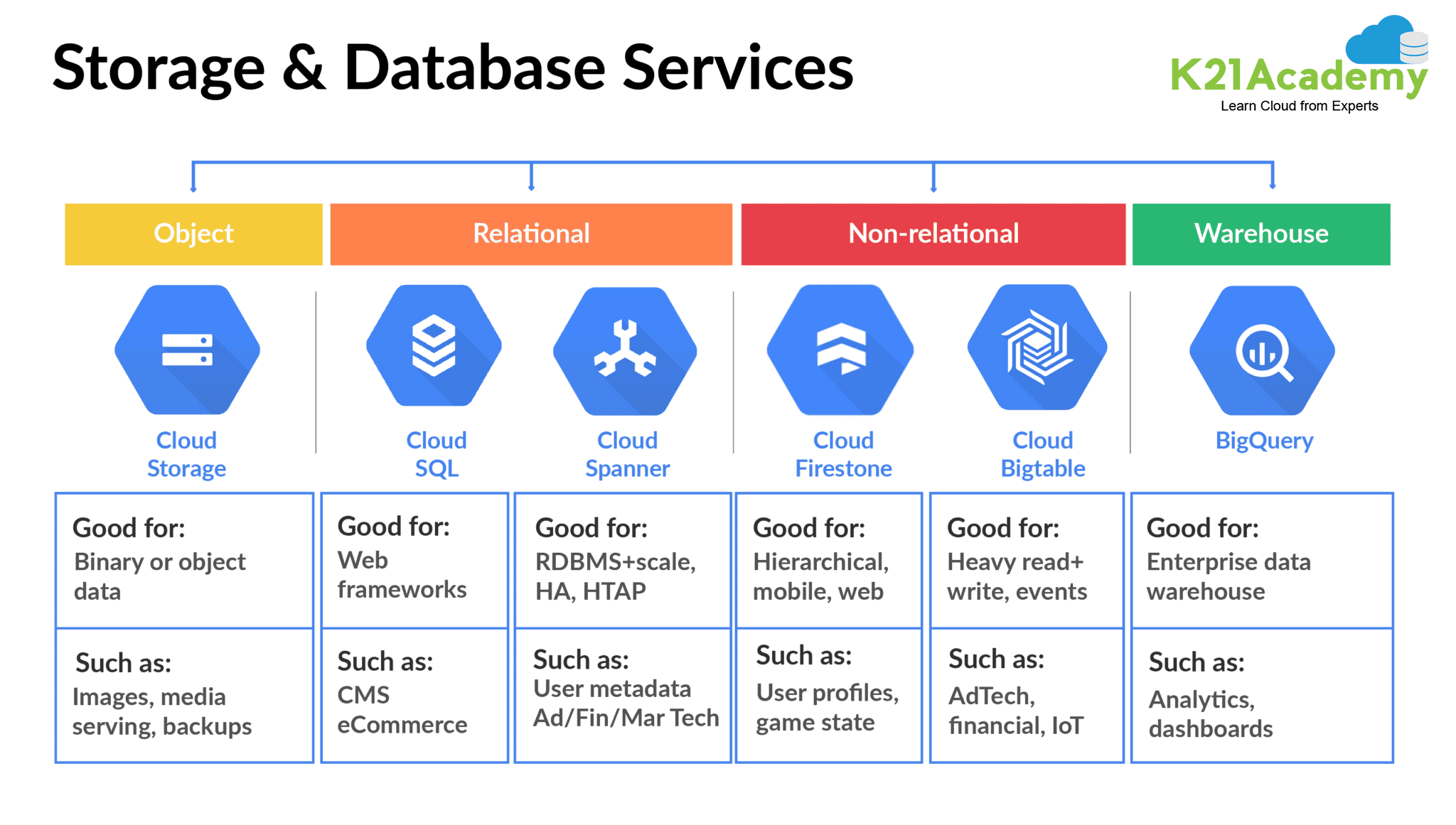
The Google storage and database services can be put into 2 categories:
1.) Structured Data
If the data can be organized in a structural format like rows and columns, it is known as structured data.
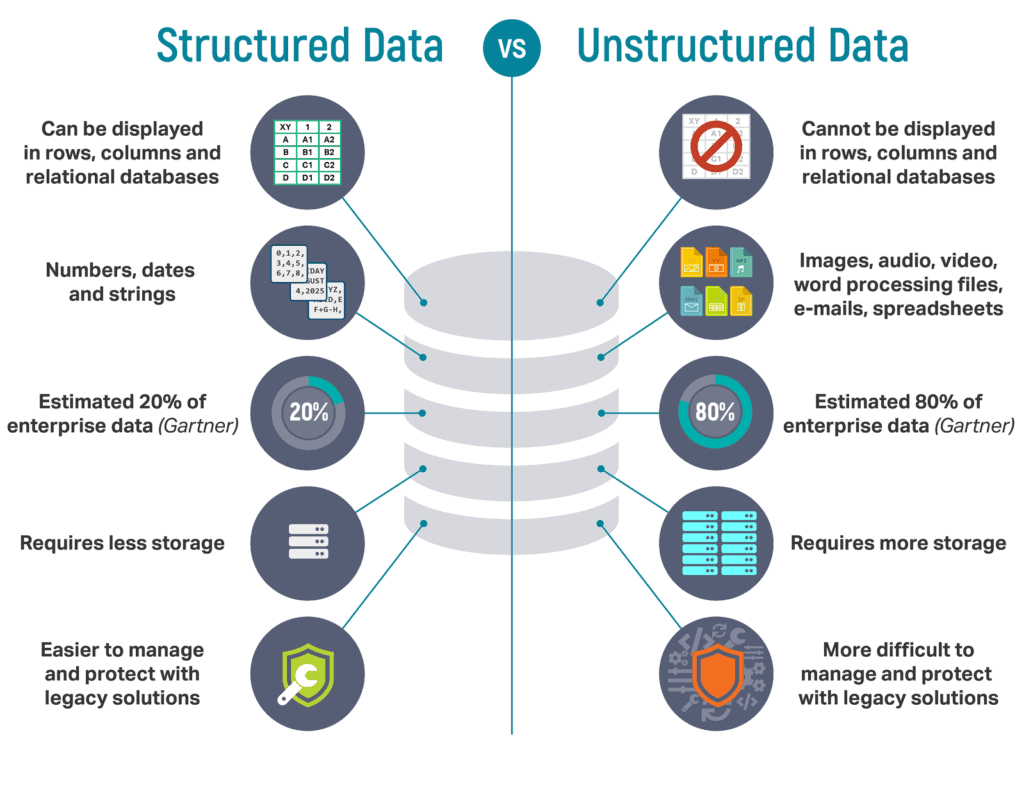
From the various offerings of Google Storage service, structured data can be stored in Cloud SQL, Cloud Spanner, Cloud Datastore, Cloud Bigtable, Cloud BigQuery, and Persistent disk.
2.) Unstructured Data
It is a sequence of bytes that could be from a video, image, or document. The data is stored as objects in buckets, and no insight can be gained from unstructured data.
Google Cloud Storage and Cloud Firestore are used to store unstructured data in the Google Cloud Platform.
Check Out: Why choose GCP.
>Google Cloud Storage Service
Google Cloud Storage is an unstructured blob/bucket storage that is scalable, fully managed, cost-effective, and highly available service. It is a service for storing objects in Google Cloud.
>Cloud Storage Components
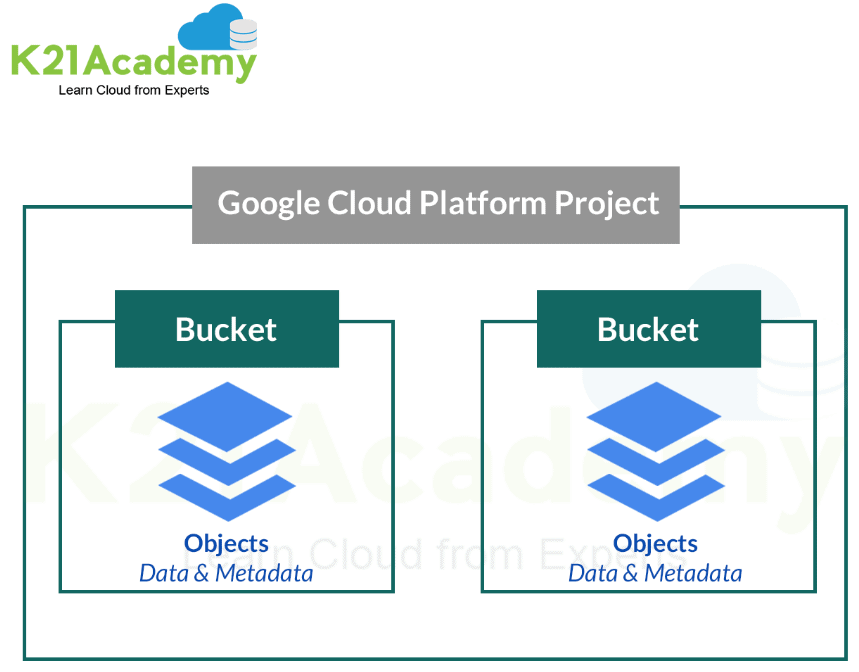
Bucket and Objects are the two main components of the Cloud.
- An object is an immutable piece of data consisting of a file of any format. These objects are stored in containers called buckets.
- All buckets are associated with a project, and you can group your projects under an organization.
Q1: How is data stored in buckets? What are objects?
Ans: Buckets are the basic containers in GCP where the data is stored in objects. Objects are the pieces of data stored inside the buckets. Objects store data in an unstructured format and inherit the storage class of the bucket they are part of.
Q2: What is the default bucket location if I do not specify a location constraint?
Ans: The default bucket location is within the US. If you do not specify a location constraint, then your bucket and data added to it are stored on servers in the US.
Q3: Can access for a bucket and its objects be set differently?
Ans: The access for any entity in GCP is set using the IAM permissions. The permission may be of two types- Uniform or Fine-Grained. In the former, all permissions applied to the bucket are also applied to the objects inside of it. In the latter, the user can apply for permissions at both bucket level and individual objects. For example, a user may have permission to view and edit a particular object inside a bucket but cannot view other objects inside the same bucket.
Q4: What is the difference between dual region and multi-region?
Ans: Dual region refers to data stored in two regions simultaneously. These two regions are pre-determined pairs set by Google (Tokyo-Osaka, Iowa-S.Carolina, Netherlands-Finland) and allow for higher availability than a single region. In multi-region, data is stored in multiple (4+) regions simultaneously, which provides for even higher availability for the data, though at a higher cost.
>Versioning and Lifecycle Policies
Cloud Storage offers the Object Versioning feature to support the retrieval of objects that are deleted or replaced.
Object Versioning retains a noncurrent object version when the live object version gets replaced or deleted. Enabling Object Versioning increases storage costs, which can be partially mitigated by configuring Object Lifecycle Management to delete older object versions.
Q5: If an object inside a bucket is updated repeatedly, would it come under object versioning or bucket versioning?
Ans: By default, buckets in GCP do not have versioning enabled; hence this scenario will come under Object Versioning. Object versioning identifies the version of the live object and retains a concurrent version of it when the object is deleted or replaced. Enabling this feature also adds to the overall cost.
>Cloud Storage Classes
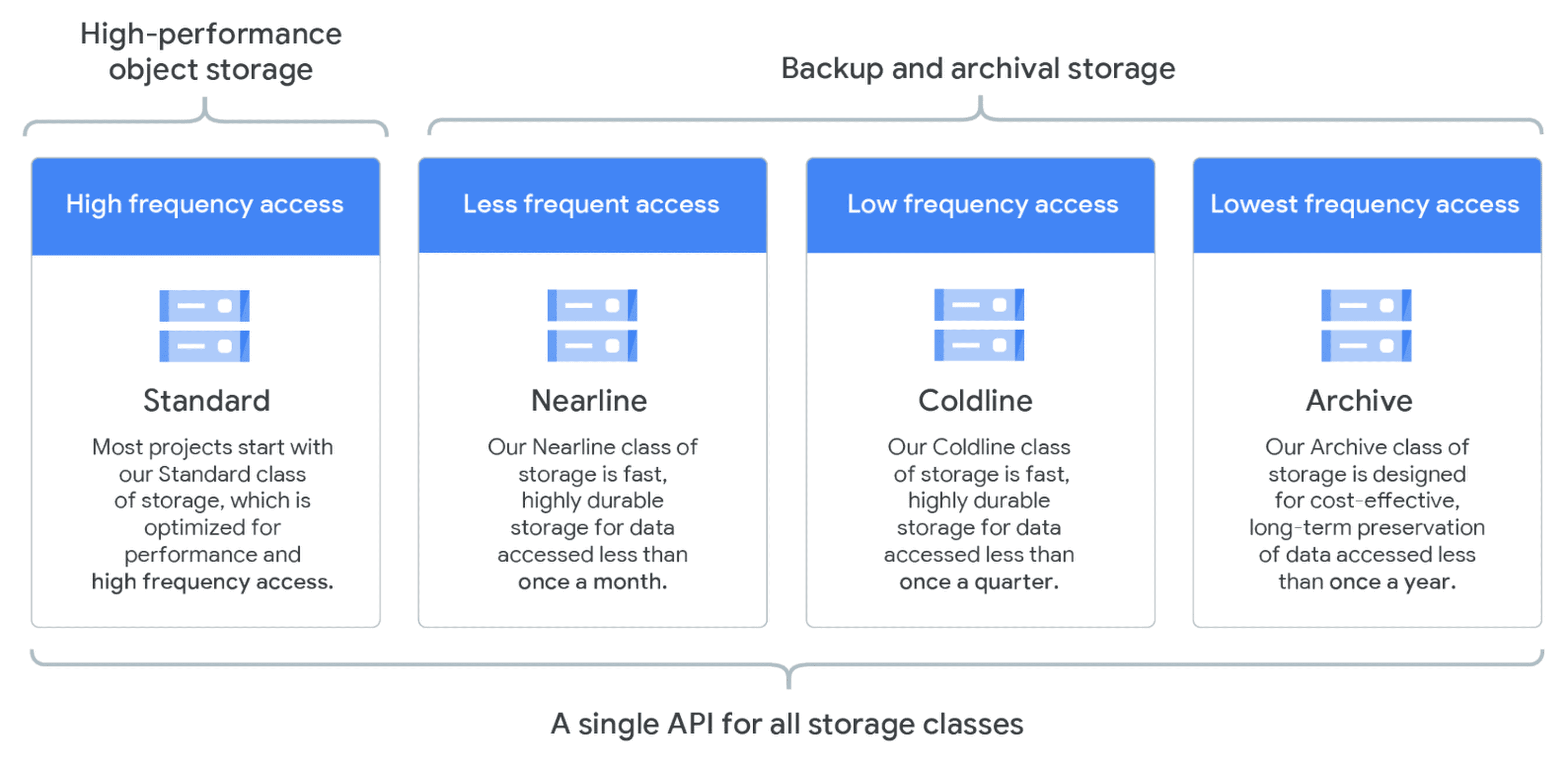
Google Cloud Storage offers 4 types of storage classes for any workload which can be used as per the requirement:
- Standard Storage: It is appropriate for “hot” data that is accessed frequently, including websites, streaming videos, and mobile apps.
- Nearline Storage: It is a low-cost option suited for data that can be stored for at least 30 days, including data backup and long-tail multimedia content.
- Coldline Storage: Very low cost suited for data that can be stored for at least 90 days, including disaster recovery.
- Archive Storage: It offers the lowest cost and is suited for data that can be stored for at least 365 days, including regulatory archives.
Q6: What are Storage Classes?
Ans: Storage Class is an attribute set for an object based on how frequently it is planned to be accessed. GCP offers a variety of storage classes, covering a wide variety of use cases. These are Standard, Nearline, Coldline, and Archival classes. The different classes also have different costs for storing and/or accessing data.
Q7: What happens to data in archival data if it is not fetched?
Ans: Data stored in Google Cloud archival storage remains secure no matter how long it is kept there. However, when the user wants to access the said data there will be a retrieval cost associated with it.
Q8: What are the best practices to select the correct storage class for your project?
Ans: Data that will be served at a high rate with high availability should use the Standard Storage class. This class provides the best availability with the trade-off of a higher price.
Data that will be infrequently accessed and can tolerate slightly lower availability can be stored using the Nearline Storage, Coldline Storage, or Archive Storage class.
>Google Cloud Database Services
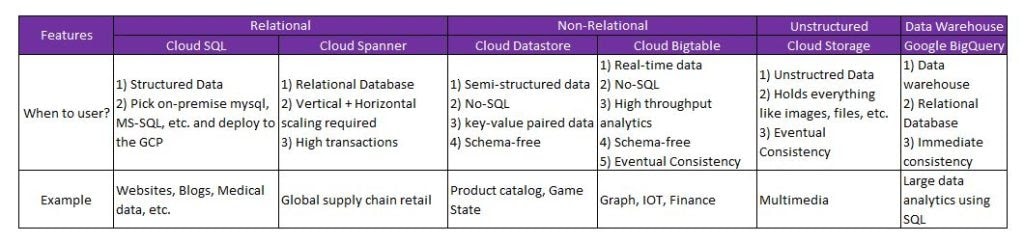
Database service offerings from Google Cloud are:
- Google Cloud SQL
- Google Cloud Spanner
- Cloud Bigtable
- Cloud Datastore
- BigQuery
>Cloud SQL
Cloud SQL is a relational database service offered in GCP, that is fully managed by Google. It can be used to work with data from MySQL, PostgreSQL, or SQL Server.

Cloud SQL has the following features:
- Less Maintenance Cost
- Ensure Business Continuity
- Ensures Security and Compliance
- Easy-Setup
- Automated Tasks
- Easy Integration
- Easy Migration
Q9. Do I need to use the Google Cloud Console to manage Cloud SQL?
Ans: No. All management tasks that can be done using the Console can also be done programmatically using the Cloud SQL Admin API or scripted using the gcloud command-line tool.
Q10: Why does SQL have an upper limit on storage?
Ans: Google Cloud SQL is meant for providing basic database services to users at a low cost, and hence, comes with a set of restrictions These include an upper cap on storage (30TB) and a lower level of data handling. For those looking for a more flexible database service, Google offers the Cloud Spanner, with comes with the ability to handle more data and no storage limit, though at an increased cost.
>Cloud Spanner
Cloud Spanner is a distributed relational database system that comes under the Google Cloud Platform. It is a globally distributed database service and storage solution. It is used by Google as well, for a number of its own services.
>Architecture
Google Spanner Architecture is based on the Paxos Algorithm that helps in data partitioning across different servers.

Q11: How can one choose between Cloud SQL and Spanner?
Ans: Cloud Spanner is very similar to Cloud SQL in that it is also a cloud-based relational database service. Cloud SQL and Cloud Spanner are both concerned with handling databases, with the major difference being the size of the database. Cloud SQL is the cheaper option that is used for smaller amounts of data. Cloud Spanner, on the other hand, is used for larger amounts of data, where a high level of consistency and scalability is required.
Check more about Cloud SQL vs Cloud Spanner
>Cloud Bigtable
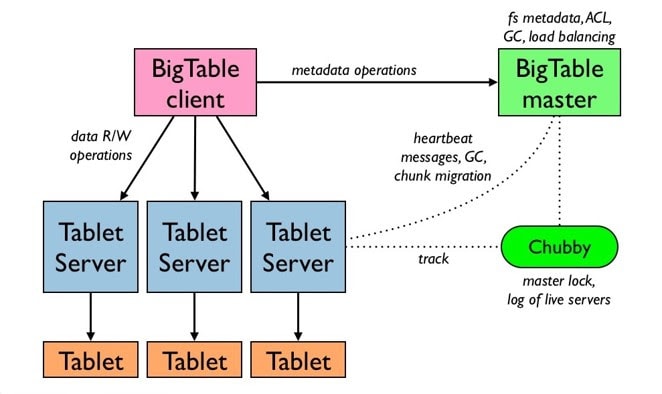
Cloud Bigtable is Google’s NoSQL Big Data database service. It is the same database powering many Google services, like Search, Analytics, Maps, and Gmail.
Used For: 1TB to hundreds of petabytes of data, Low latency, and Autoscaling via nodes
Common Workloads: Fintech, Adtech, Internet of Things, Machine Learning Applications
Q12: What options are there in GCP for a large amount of data?
Ans: There are multiple ways of working with large amounts of data in the Google Cloud Platform. The solution is largely dependent on whether the need is to just store the data or also do operations on it.
In the first case, where the user is looking for just storing data, Cloud Storage is a cost-effective option. A few ways in which Cloud Storage can be utilized with Big Data is
- Loading data into BigQuery
- Using Cloud Storage buckets to hold staging files and temporary files for Dataflow
- Using Dataproc to enable the use of Cloud Storage buckets in parallel with HDFS
Based on the intended work, Google also offers various storage services to work with a large amount of data. These are:
- Cloud PubSub
- Cloud Dataproc
- Cloud Dataflow
- Cloud Dataprep
- Cloud Compos
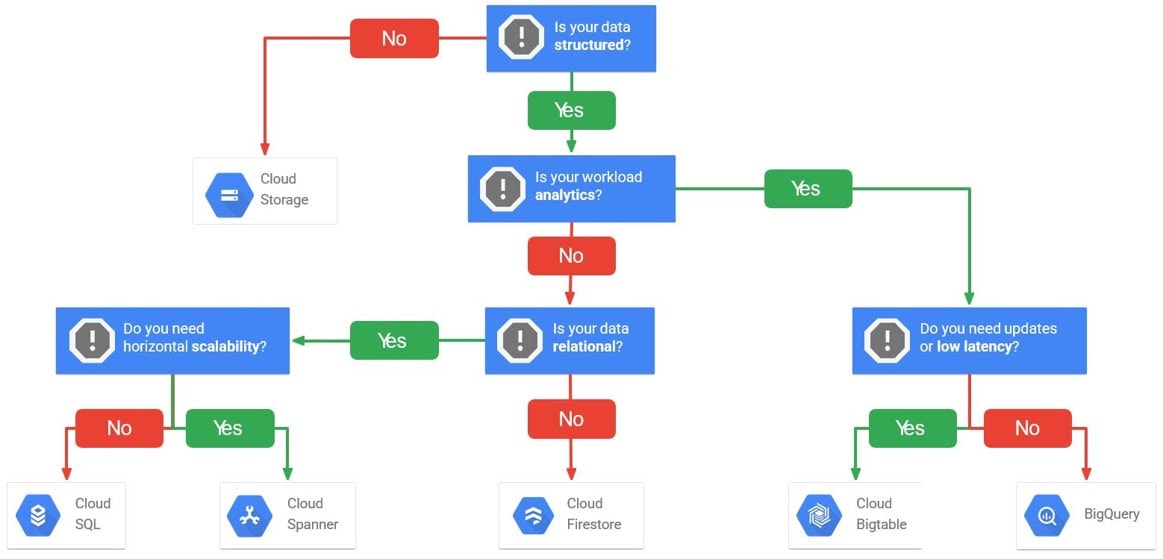
>Select The Right Storage Service Option For Your Workload
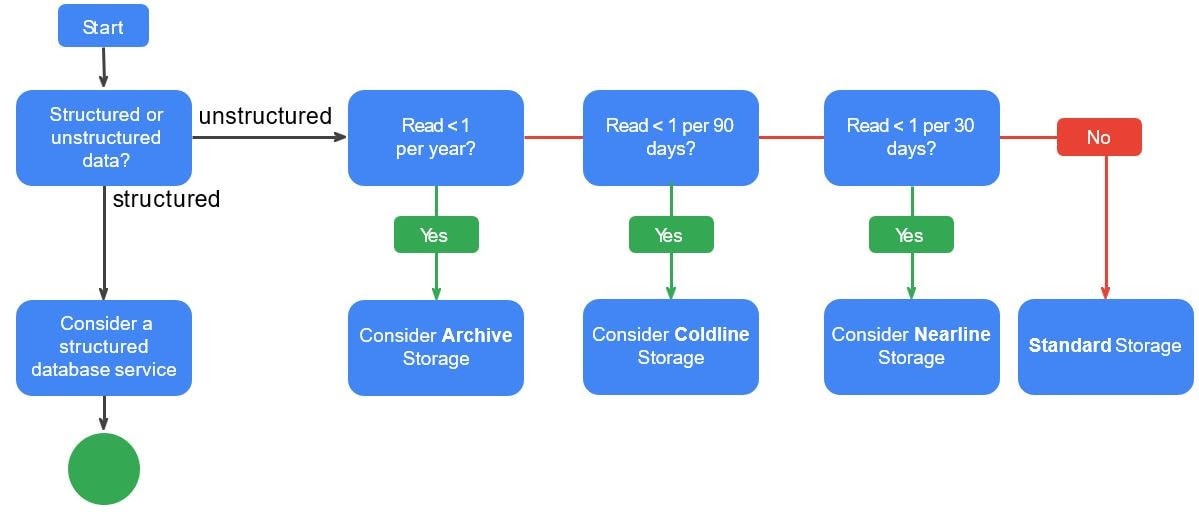
You can follow the given flowchart to identify the right storage service option for your project.
Quiz Time (Sample Exam Questions)!
With our Google Professional Cloud Architect training program, we cover 200+ sample exam questions to help you prepare for the certification.
Check out one of the questions and see if you can crack this.
Ques: Your application has a large international audience and runs stateless virtual machines within a managed instance group across multiple locations. One feature of the application lets users upload files and share them with other users. Files must be available for 30 days; after that, they are removed from the system entirely. Which storage solution should you choose?
A. Cloud Datastore database.
B. A multi-regional Cloud Storage bucket.
C. Persistent SSD on virtual machine instances.
D. A managed instance group of Filestore servers.
Comment down your answer in the comment box.
Feedback
We always improve and be the best version of ourselves from the previous session, hence constantly asking for feedback from our attendees.
Here are the feedbacks that we received from our trainees who had attended the session.

Related References
- Google Cloud Architect Q/A| Day 1 Live Session Overview
- Google Cloud Architect Q/A| Day 2 Live Session Overview
- Google Cloud Architect Q/A| Day 3 Live Session Overview
- Google Professional Cloud Architect: Step-By-Step Hands-On Guide
- Google Cloud Platform Console Walkthrough
- Google Cloud Functions
Next Task For You
If you are also interested and want to know more about the Google Professional Cloud Architect certification, register for our Free Class.


![Microsoft Agentic AI Business Solutions Architect [AB-100] | K21 Academy](https://test.k21academy.com/wp-content/uploads/2025/11/Microsoft-Agentic-AI-Business-Solutions-Architect-AB-100-Exam-Overview1.png)


