



This blog post will go through some quick tips including Q/A and related blog posts on the topics that we covered in the Azure DevOps Engineer Day 2 Live Session which will help you gain a better understanding and make it easier for you to
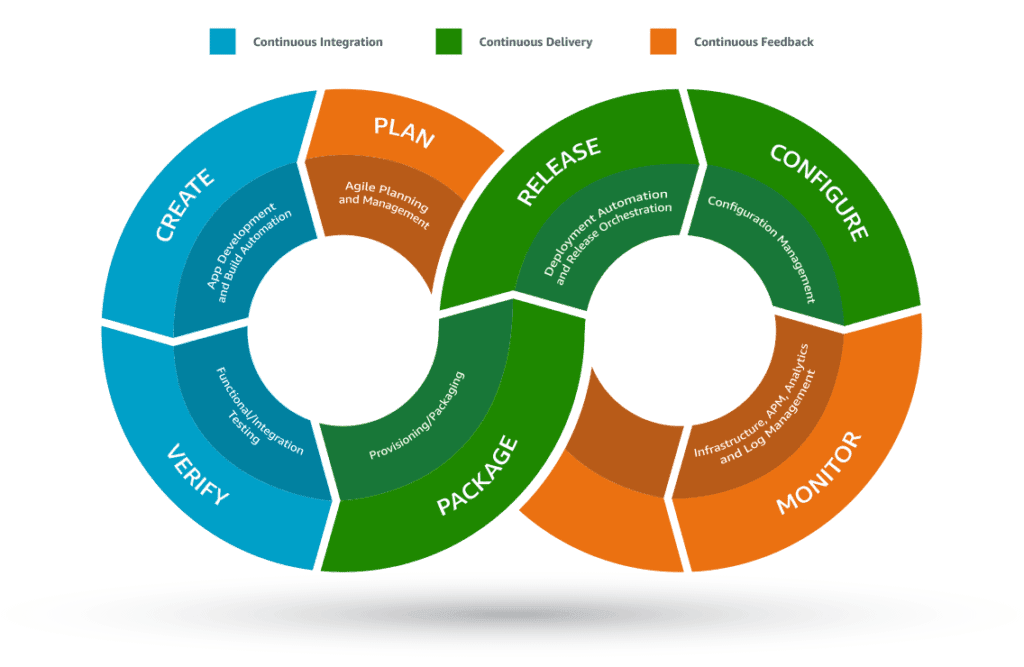
This week’s Day 2 Live Session started with Module2: Implement DevOps Development Processes. We have covered What is Azure pipeline?, Azure DevOps Security, What is defense in depth model?, Layers of defense in depth, Source Control, Azure Repos, Branching, Pull Request, Feature Branch, Git Branching Workflow, GitHook, Branch Lock.
What is Azure pipeline?
Azure Pipelines is a cloud-based continuous integration and continuous delivery (CI/CD) service provided by Microsoft Azure. It allows developers to automate the building, testing, and deployment of their applications across various platforms and environments.
Azure Pipelines supports a wide range of programming languages, frameworks, and platforms, including Windows, Linux, macOS, and containers. It integrates with popular development tools, such as Visual Studio, GitHub, and Azure DevOps, providing a seamless and automated workflow for software development.
Azure DevOps Security:
- Access Control: Azure DevOps provides robust access control mechanisms to manage user permissions and restrict access to sensitive resources. You can define granular permissions at the organization, project, and repository levels.
- Authentication and Authorization: Azure DevOps supports various authentication methods, including Azure Active Directory (AAD), personal access tokens (PATs), and OAuth. Authorization can be enforced through security groups and role-based access control (RBAC).
- Secure Code Repository: Azure Repos, the version control system in Azure DevOps, ensures secure storage of source code. It supports branch policies, code reviews, and pull requests, enabling code quality and security checks before merging.
- Build Pipeline Security: Azure Pipelines allows you to define secure build pipelines with controlled access to build agents, signing packages, and secure storage of build artifacts.
- Continuous Integration/Continuous Deployment (CI/CD) Security: Azure DevOps facilitates secure CI/CD pipelines by integrating with Azure Key Vault for secure storage of secrets and certificates. It also supports approval gates, release gates, and secure deployment strategies.
What is defense in depth model?
The Defense in Depth (DiD) model is a comprehensive approach to security that involves implementing multiple layers of security controls and measures to protect an organization’s assets and data. The model is based on the principle that no single security measure can provide complete protection against all threats and that a combination of overlapping layers is necessary to create a strong defense.
Layers of defense in depth
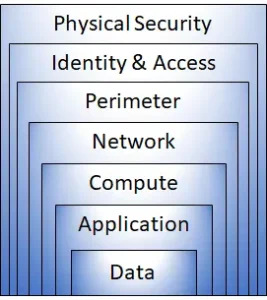 Each layer provides protection, so if one layer is breached, the next layer is in place to prevent further contamination. This method eliminates the expectation of a layer of protection. It mitigates attacks and provides telemetry alerts that security teams can enable automatically or manually.
A brief summary of each layer :
- The physical security layer is the first line of defense for protecting computer hardware in the data center.
- Identity and Access Layer Control access and change management for infrastructure.
- The environment uses Distributed Denial of Service (DDoS) protection to filter out large-scale attacks before they cause a denial of service to users.
- Network protocol restricts communication of resources through distribution and management.
- The Compute layer is blocking access to the virtual machine.
- The application layer helps ensure that the application is secure and free of security barriers.
- The data layer controls access to the business and customer data you need to protect.
These layers provide guidance to help you set security settings across all layers of your application.
Source Control
Source Control is a way in which the organization keeps track of every change that is happening in the source code. In simpler terms, source control is a practice where an organization records every step and every action a person has done to know who to ask if any changes. It is also called a Version Control System.
In DevOps, this is one of the most critical parts. In DevOps, we do Continuous Integration and Continuous Delivery, so sometimes the source code comes from various people, and while merging the code, it becomes complex. So there, we can use Source Control to check and resolve the conflict. For example, Microsoft has Azure Repos in DevOps as a Version Control, and Git is one of the open-source version control tools.
Know more about Source Control, here.
Question 1: Do we install GIT credential manager on our local PC?
Answer: When you install GIT on your local PC/Laptop the GIT Credential Manager is automatically installed. And if your GIT password changes then you have to reset the password in the credential manager also.
Question 2: Does choosing Repository based on the code behind the project, or based on the cloud Provider or the differentiating factor to choose Centralized or Distributed Repo?
Answer: You should choose centralized when you have your Servers of Azure DevOps management. It would be best if you went for Distributed one because of the Cloud Platform. Azure DevOps also supports the Team Foundation Repo.
Nowadays, the Cloud Service Providers has developed the repository support so that they are looking to use Distributed Version Control. Still, if you want to use the Centralized Version Control, you have to set up a DevOps Environment in your environment.
Azure Repos
The Repository is a space or place where generally a developer stores the code and appropriately manages the code with proper version control.
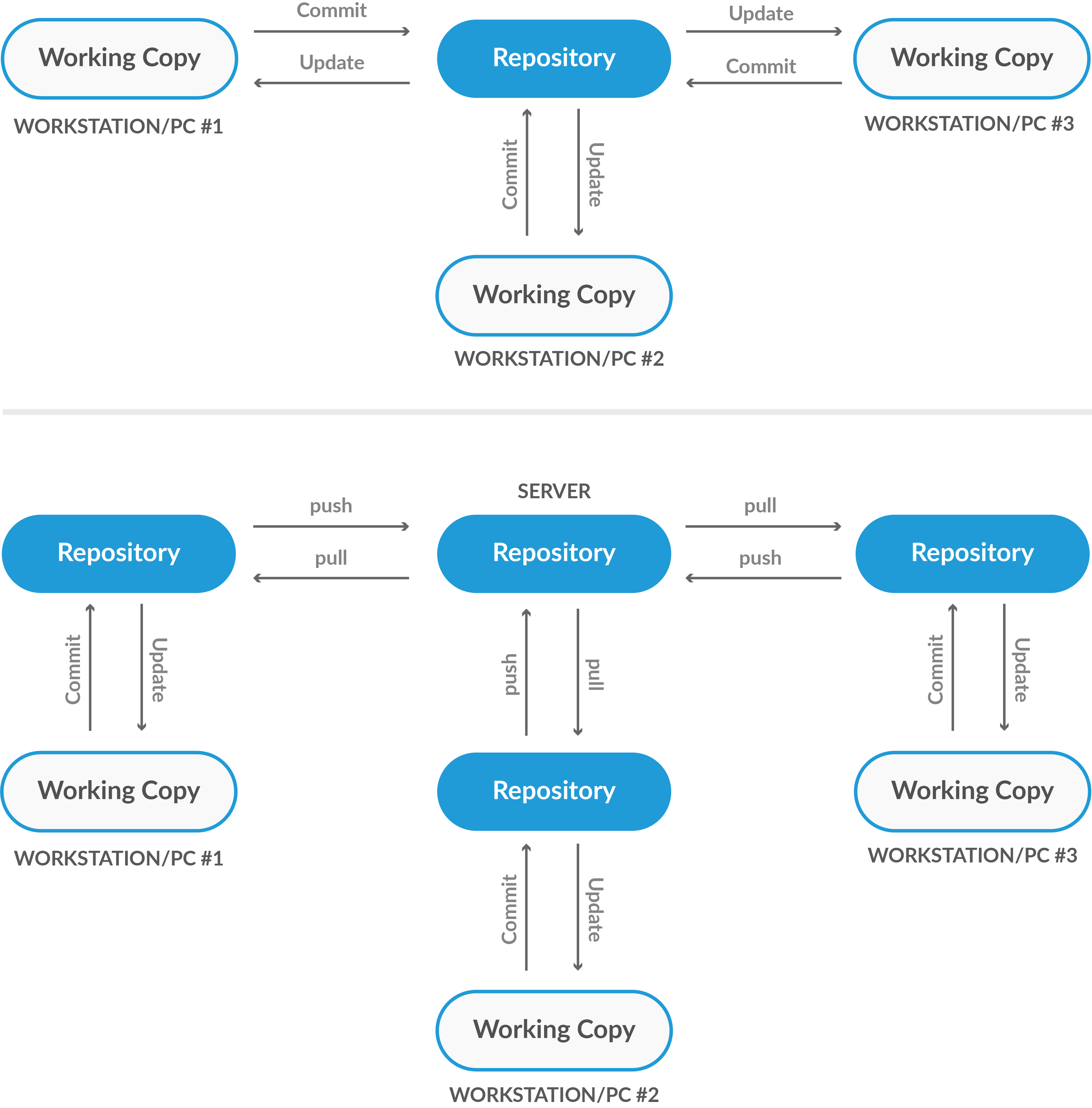
Azure Repo is also a kind of Repository. Azure Repos is a combination of a version control tool that helps to manage code. There are mainly 2 Version Control Tool that Azure Repo provides, Git and Team Foundation Version Control. Where Git is Distributed Version Control, and TFVC is Centralized Version Control System.
A Centralized Version Control is a system where a single central copy of your project and programmers commit their changes to this primary copy. Commonly used centralized version control systems are TFVC, CVS, Subversion (or SVN) and Perforce.
A Distributed Version Control is a system where every developer clones a copy of a repository and has the project’s entire history. Common distributed source control systems are Mercurial, Git and Bazaar.
Know more about Azure Repos, here
Branching
A branch is simply a new version of the source code created when someone changes the source code. Branch allows you to work independently and give you an isolated environment where you can develop without worrying about the original source code. And the branch where you want to merge all the changes is called the Main Branch or Master Branch, depending on the Version Control System you are using.
Generally, branching is selected when the team has to fix any bug fixing, develop a new Release, i.e., taking the code to a production/testing environment or feature testing.
Know more about Branching Strategy DevOps, here
Pull Request
Pull Request is when you ask the Admins or the repo owner to add the changes you have committed in your branch into the main branch or the default branch.
It allows you to tell others regarding changes you have pushed to a branch in an already present repository on GitHub or any other platform. Once a pull request opens, you’ll be able to discuss and review any suggested changes made by the collaborators and add follow-up commits before your changes merged in the default branch.
Know more about Pull Requests, here.
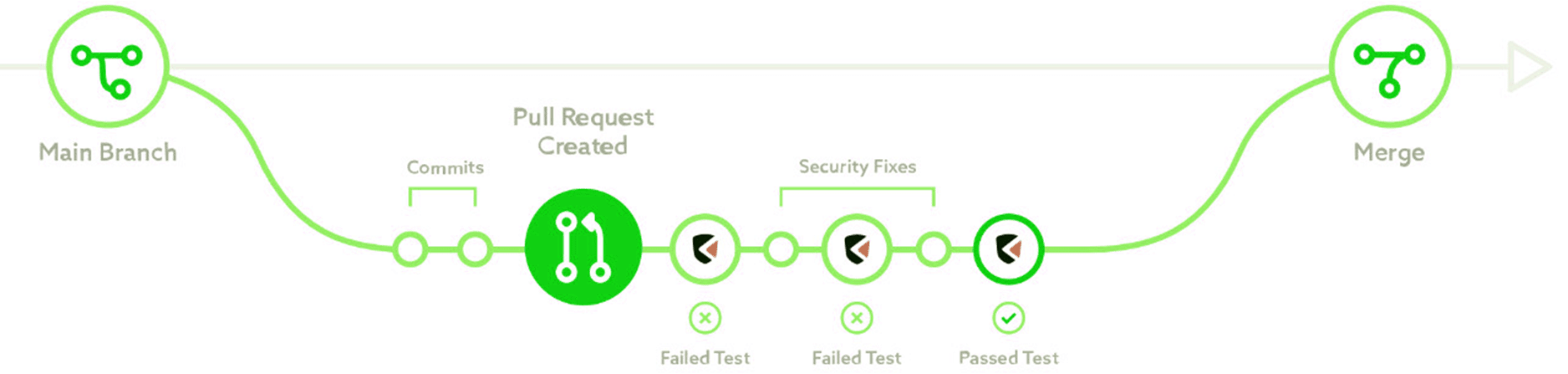
Question 3: In Git, do you still need some central location for all final codes to store and pull from, even though Git is distributed and my own code will be local on my computer?
Answer: Yes, it’s correct, but you can distribute the code available in a repo to your computer. You can share the entire repository, which includes the history of codes from Azure Repos to anywhere if we have permission, and that’s what makes GIT as Distributed Version Control. In Team Foundation Server, it’s impossible to take the entire repo because we focus on permission limited to a specific scope.
Question 4: If I pull all codes from Git, I can work on other codes, not just mine?
Answer: If you pull all the code, you can work on other developments made by other teams in that code. But all the changes that you make will not affect the code present on Git because you are making changes locally. You can ask the concerned team to allow your changes to merge on Git.
Know more about Pull Requests, here
Feature Branch
Feature Branch is the identical copy of the main branch which developers use to test a feature.
Developers make a copy of the main branch, develop new features on it, commit the changes, open a pull request, and then code is merged in the Main branch after approval. The feature branch method is very effective for the continuous integration environment as the main branch is never disturbed.
Git Branching Workflow
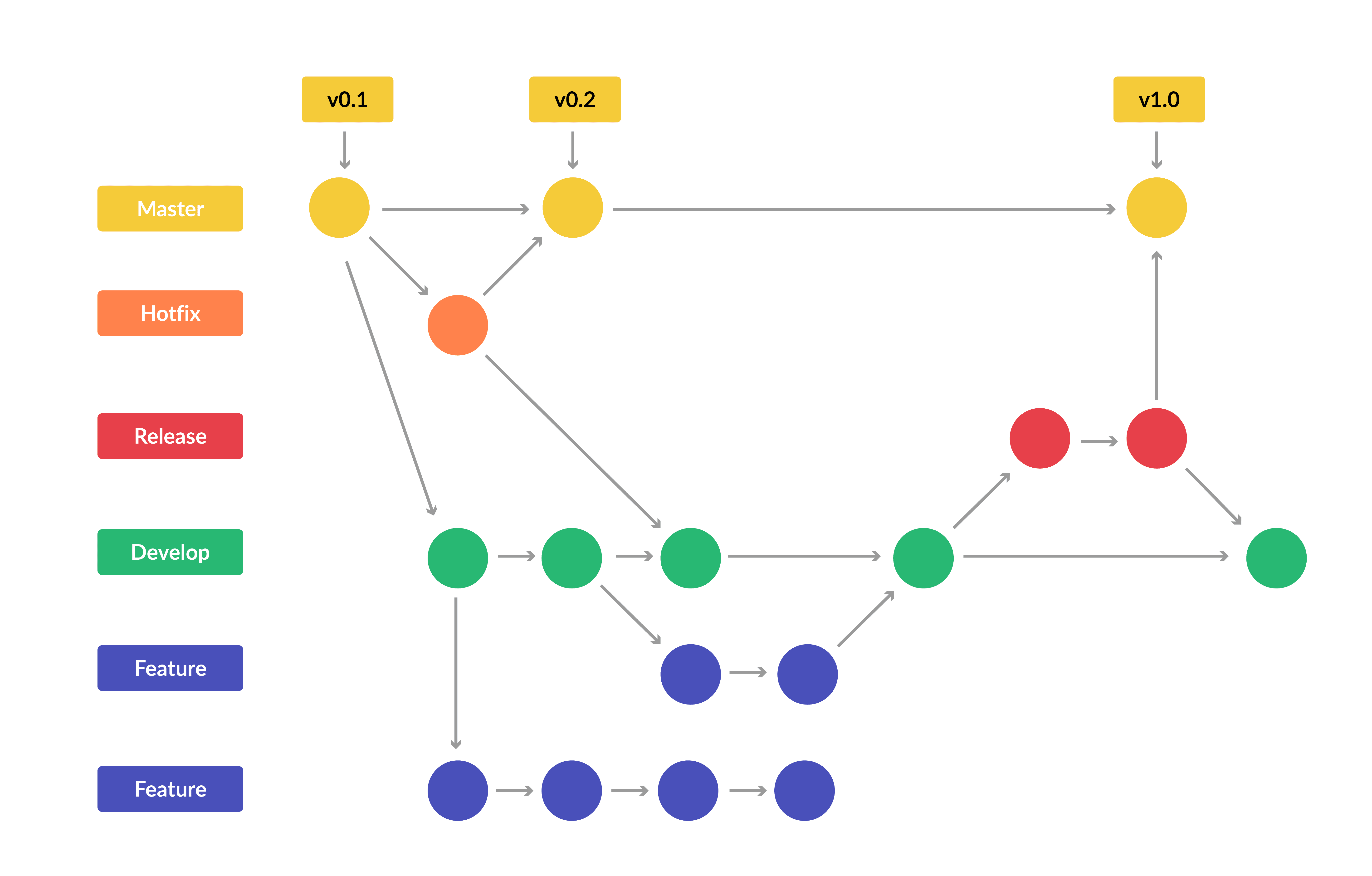
Git Branching is the same as Feature Branching. Only here, we make a copy of the main branch, let’s call it as Developer Branch, then make a copy of the new copied branch(Developer Branch) for creating two separate branches: Release and Feature. After doing changes and committing them, we merge the request to a new branch called Hotfix Branch.
Hotfix Branch is a combination of code from both Release and Feature Branch, thus having code to release with the perfect feature. The purpose of the Hotfix Branch is to fix any release or feature issue before merging it to the Developer Branch and then to the Main branch.
Know more about Branching Strategy DevOps, here.
Quiz Time ( AZ-400 Sample Exam Question!)!
With our DevOps Engineer Program, we cover 150+ sample exam questions to help you prepare for the certification AZ-400.
Check out one of the questions and see if you can crack this…
References
- [AZ-400] Microsoft Azure DevOps Certification Exam: Everything You Need To Know
- [AZ-400] Microsoft Azure DevOps Training: Step By Step Activity Guides/Hands-On Lab Exercise
- Branching Strategy DevOps | Git Branching Model | Git Branch Policy | Restoring A Deleted Branch
- What is Azure DevOps Services: The Ultimate Guide for Beginners
Next Task For You
Begin your journey toward Mastering Azure Cloud and landing high-paying jobs. Just click on the register now button on the below image to register for a Free Class on Mastering Azure Cloud: How to Build In-Demand Skills and Land High-Paying Jobs. This class will help you understand better, so you can choose the right career path and get a higher paying job.


![Microsoft Agentic AI Business Solutions Architect [AB-100] | K21 Academy](https://test.k21academy.com/wp-content/uploads/2025/11/Microsoft-Agentic-AI-Business-Solutions-Architect-AB-100-Exam-Overview1.png)


