This blog post will go through some quick tips including Q/A and related blog posts on the topics that we covered in the Azure Administration Day 2 Live Session which will help you gain a better understanding and make it easier for you to learn the Azure Administration, clear the [AZ104] Certification & get a better-paid job.
The previous week, In Day 1 session we got an overview of Cloud Concepts, Cloud Service Models, Azure Overview, Azure Region, Azure Governance & Compliance, Subscriptions and Accounts Overview, Azure Resource Manager, Azure Policy, Azure RBAC, Resource Tags, Azure Resource Lock, and also performed hands-on, where we have created Resource Groups and configured Virtual Networks, Virtual Machines, Azure Policy and many more.
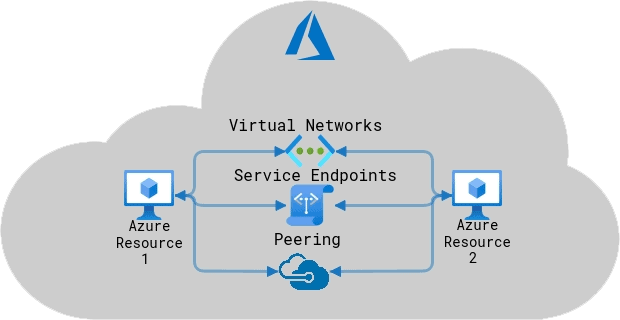
Azure Virtual Networking (VNet) is the fundamental building block for your private network in Azure. VNet enables many types of Azure resources, such as Azure Virtual Machines (VM), to securely communicate with each other, the internet, and on-premises networks. Virtual Machine is no different than any other physical computer like a laptop, smartphone, or server.
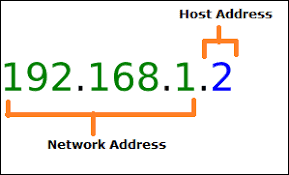
An Internet Protocol Address is a numerical label assigned to each device connected to a computer network that uses the Internet Protocol for communication. An IP Address serves two main functions: host or network interface identification and local addressing.
Public IP and Private IP
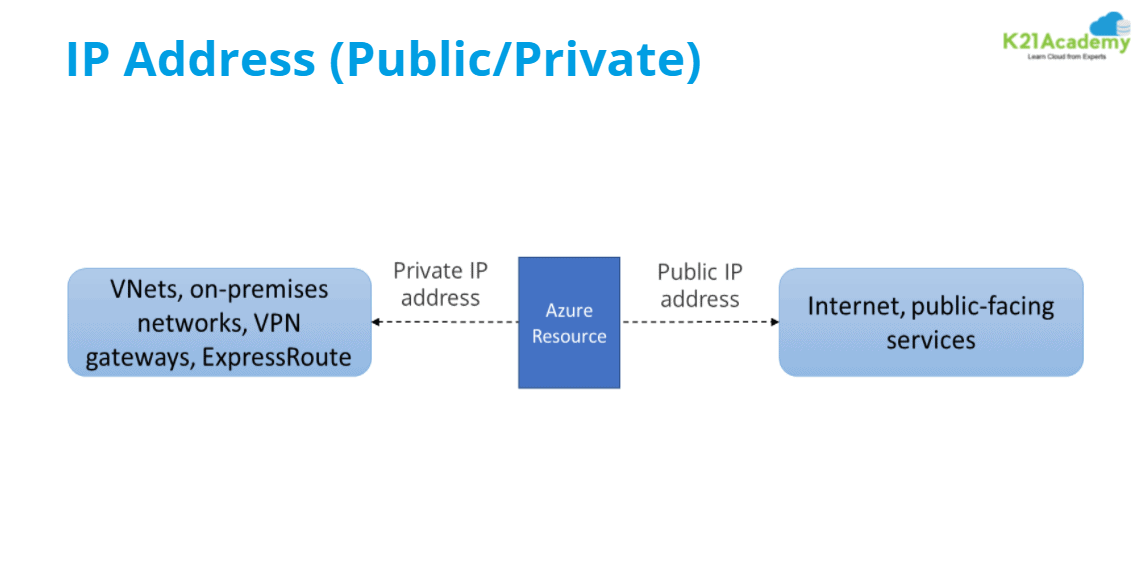
Public IP addresses allow internet resources to communicate inbound to Azure resources. Public IP addresses enable Azure resources to communicate to internal and public-facing Azure services. The address is dedicated to the resource until it’s unassigned by you. Azure dynamically assigns an available IP address that isn’t dedicated to the resource.
Private IP addresses are used for communication within a Virtual Network, your on-premises network, and the Internet. You must assign at least one private IP address to a virtual machine. Helps a private network to connect securely to other devices within that same network.
Subnets
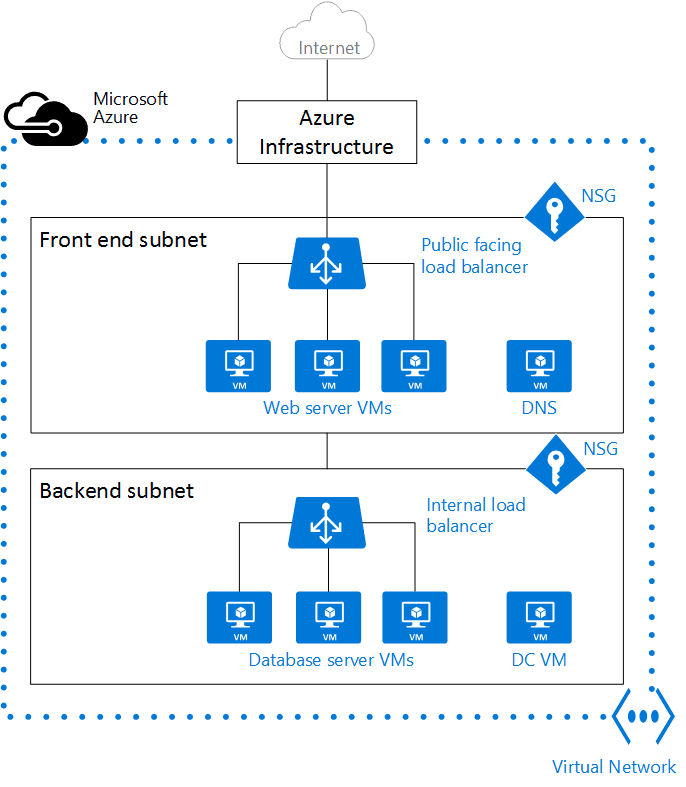
A subnet is a range of IP addresses in the virtual network. You can divide a virtual network into multiple subnets for organization and security. Each Network interface card connected in a virtual machine is connected to one subnet only.
Q1. Can we change VM from subnet 2 to subnet 1?
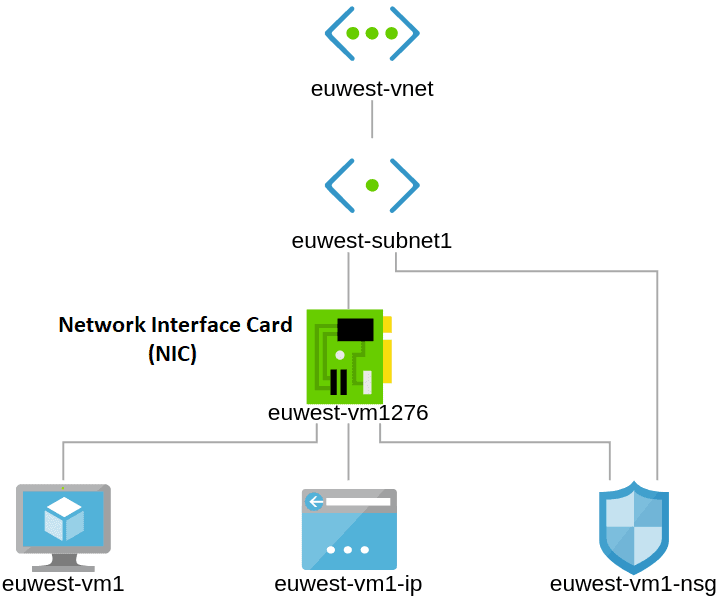
Ans. We first need to understand how a Virtual Machine is integrated with a subnet. To be more specific Virtual Machines are not directly connected with a Subnet. Virtual Machines are connected with Network Interface Card and in turn, those NICs are connected to the Subnets. So, technically, it is not possible to change the Subnet of a Virtual Machine as they are really not connected with the Subnet.
So, in order to change the Subnet associated with a Network Interface Card, navigate to the NIC to which the Virtual Machine is connected by clicking on the NIC associated with the Virtual Machine.
Q2. Why would there be a need to reserve public IP?
Ans. There are a few reasons why you need a Reserved IP address
Easy A-Record DNS: Because you maintain the same public IP after delete and shutdown VMs, you can avoid having to reprogram DNS or other applications depending upon the IP to the newly assigned IP when you restart.
On-Premise Connectivity Security: You can now provide access to your Azure Services from your enterprise network, leveraging the public IP but controlling and access through your proxy/firewall on-premises. You now don’t need to worry about re-programming that each time you start and stop your VM. Check more on Public IP Address.
Azure Virtual Machine
A Virtual Machine (VM) is a computing service that performs most functions of a physical computer, actually behaving like a separate computer system. A virtual machine, usually known as a guest, is created within another computing environment (i.e., Physical Datacenters) referred to as a “host.“
An Azure VM gives you the flexibility of virtualization without having to buy and maintain the physical hardware that runs it. However, you still need to maintain the VM by performing tasks, such as configuring,patching, and installing the software that runs on it.
A Network Interface (NIC) is an interconnection between a Virtual Machine and the underlying software network. An Azure VM has one or more network interface cards (NICs) attached to it.
Network Interface Card (NIC) is assigned with IP address and associated with NSG rules, which is used for the communication between virtual machines or internal network or internet.
Q3: What is RDP?
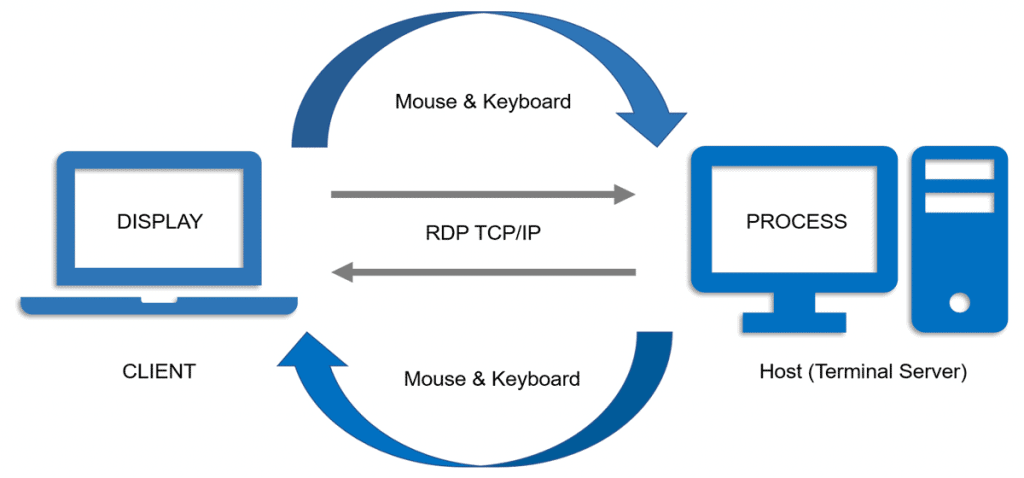
Ans:Remote Desktop Protocol (RDP) was developed by Microsoft Corporation to provide users with the ability of a remote connection to servers and computers running Windows operating systems.
In fact, with this protocol users can work on a remote computer as they are working directly on it.RDP is a Microsoft proprietary protocol that enables remote connections to other computers, typically over TCP port 3389.
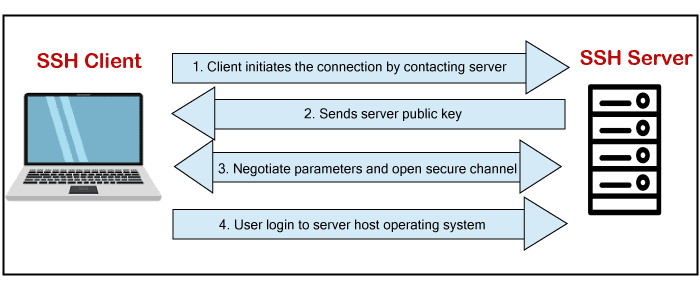
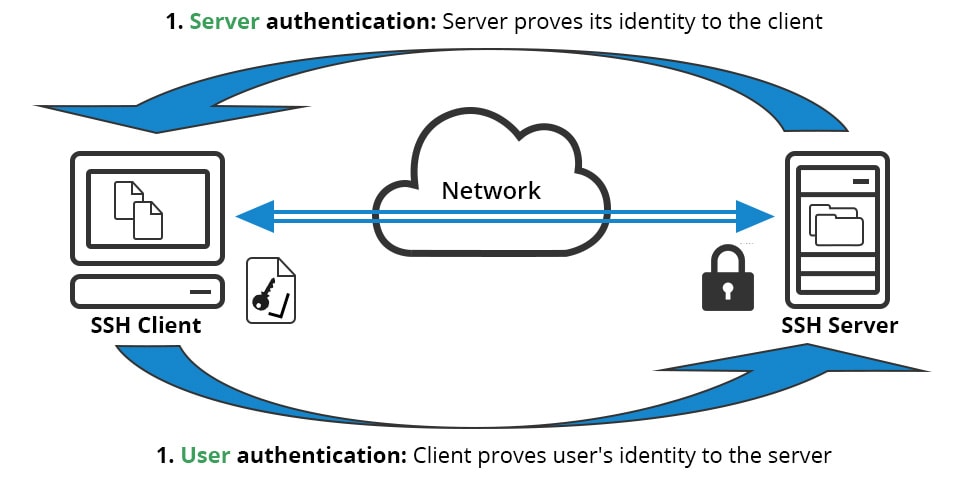
SSH is a protocol, which stands for Secure Shell or Secure Socket Shell. The secure shell is useful for security while connecting to a remote server. The ssh command uses an ssh protocol, which is a secure protocol, as the data transfer between the client and the host takes place in encrypted form. It transfers the input through the client to the host and returns the output transferred by the host. It executes through TCP/IP port 22.
To establish an SSH connection, we need two primary components; a client and a host, which can be a server, domain name, IP address, and more. Also, we require an ssh client to connect with another computer or server. The client uses the specified host information to establish the connection; if the provided credential is verified, it will establish an encrypted connection.
Q4: SSH is used only for Linux VM?
Ans:No, it is used for another operating system as well Linux,macOS,Solaris, etc.,
It is a protocol used to securely connect to a remote server/system.
It is secure in the sense that it transfers the data in encrypted form between the host and the client.
It transfers inputs from the client to the host and relays back the output.
Q5: Please explain when SSH might be used?
Ans: SSH is typically used to log into a remote machine and execute commands, but it also supports tunneling, forwarding TCP ports;
It can transfer files using the associated SSH file transfer (SFTP) or secure copy (SCP) protocols.
It uses the client-server model.
The standard TCP port for SSH is 22.
It is generally used to access Unix-like operating systems, but it can also be used on Microsoft Windows.
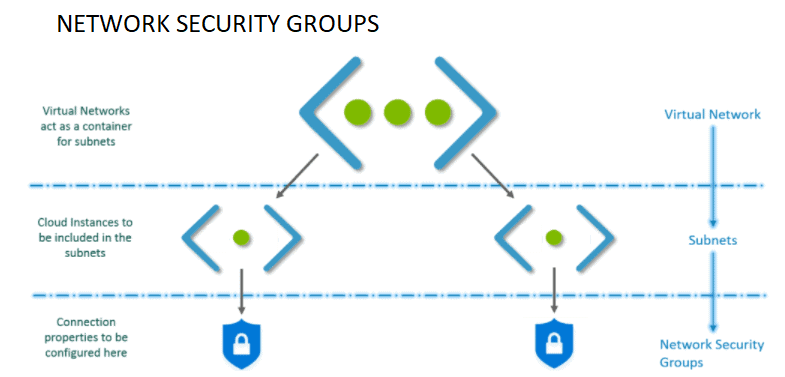
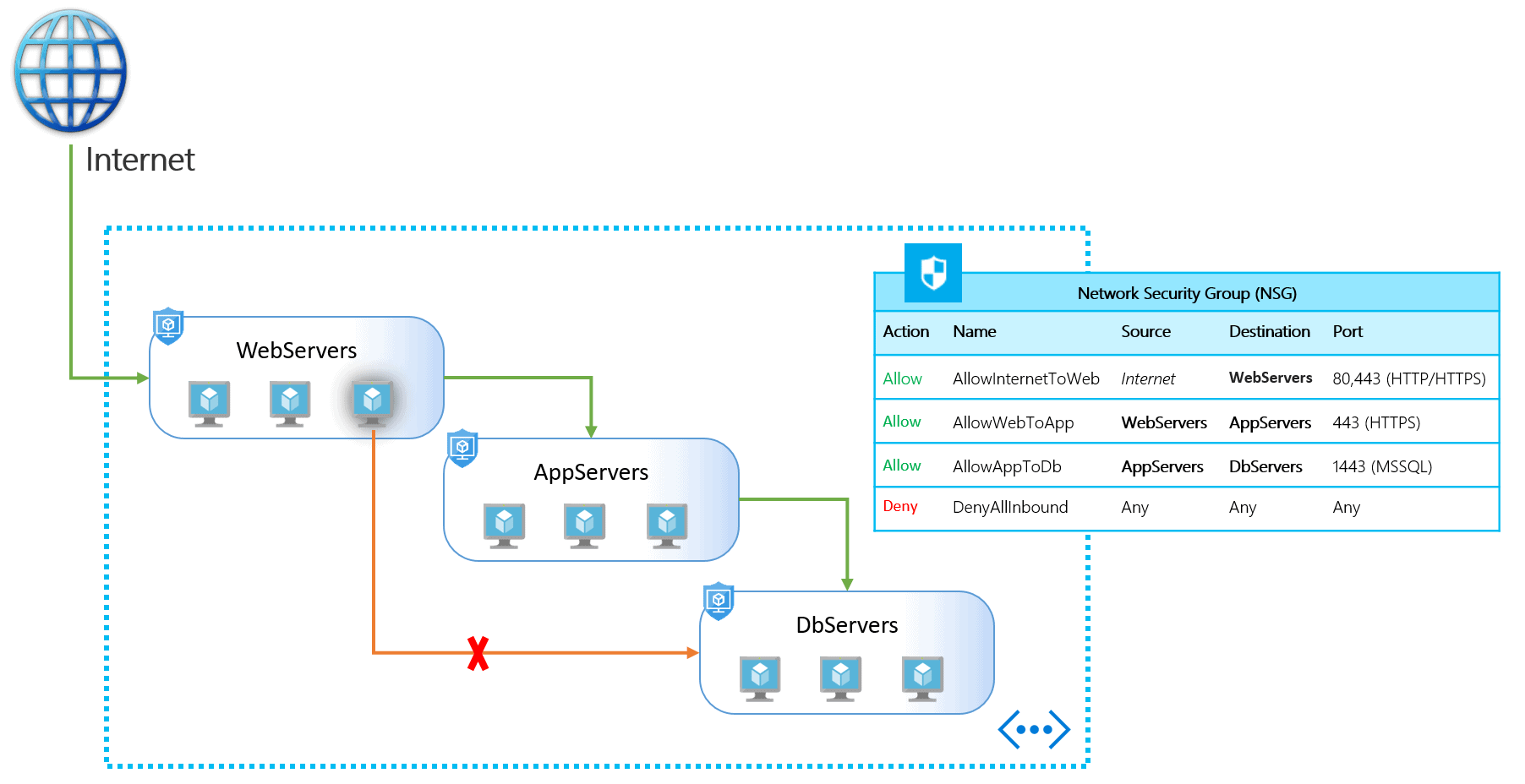
A Network Security Group consists of a set of access control rules that describe traffic filters. These can be associated with a virtual machine or a subnet in the same region. The rules defined in the Network Security Group act as filters.
Use to permit or deny traffic (inbound or outbound), via rules, to a subnet or network interface. Any Azure virtual network can be placed into a security group where different inbound and outbound rules can be configured to allow or deny certain types of traffic. For each rule, you can specify source and destination, port, and protocol.
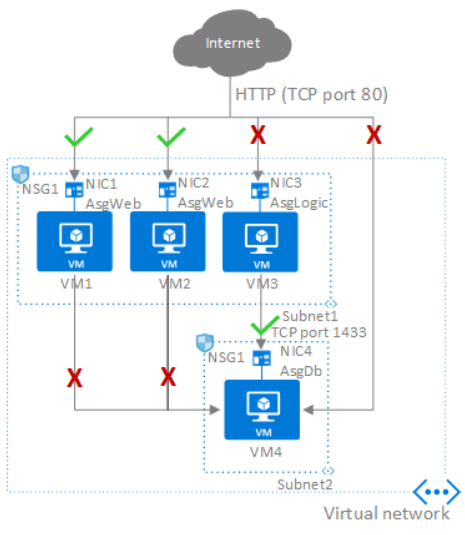
Application Security Groups help to manage the security of Virtual Machines by grouping them according to the applications that run on them. It is a feature that allows the application-centric use of Network Security Groups. Access is always granted based on workloads.
Q6: What are the difference between Network Security Groups and Application Security groups?
Ans: The differences are explained below:
Network Security Groups
Normally when you deploy a network security group (NSG) it is either assigned to a NIC or a subnet (preferred). If you deploy that NSG to a subnet then the rules apply to all of the NICs, or virtual machines, in that subnet. This is OK when you’re deploying a new system where you can easily place virtual machines into subnets, and treat each subnet as its own security zone.
But in the real world, things aren’t always that clean, and you might need something that allows a more dynamic or flexible means of assigning rules to some machines in a subnet.
Application Security Groups
ASGs are used within an NSG to apply a network security rule to a specific workload or group of VMs — defined by ASG worked as being the “network object” & explicit IP addresses are added to this object. This provides the capability to group VMs into associated groups or workloads, simplifying the NSG rule definition process.
Another great use of this is for scalability, creating the virtual machine and assigning the newly created virtual machine to its ASG will provide it with all the NSG rules in place for that specific ASG — zero distribution to your service!
Azure Firewalls
Azure Firewall is a managed, cloud-based network security service that protects your Azure Virtual Network resources. Controlling outbound network access is an important part of an overall network security plan.
For example, you may want to limit access to websites. Or you may want to limit the outbound IP Addresses and ports that can be accessed.
One way you can control outbound network access from an Azure subnet is with Azure Firewall.
Ans: Azure Firewall supports rules and rule collections. A rule collection is a set of rules that share the same order and priority. Rule collections are executed in order of their priority. Network rule collections are a higher priority than application rule collections, and all rules are terminating.
There are three types of rule collections:
Application rules: Configure fully qualified domain names (FQDNs) that can be accessed from a subnet.
Network rules: Configure rules that contain source addresses, protocols, destination ports, and destination addresses.
NAT rules: Configure DNAT rules to allow incoming Internet connections.
Q8: What is the difference between Network Security Groups (NSGs) and Azure Firewall?
Ans: The Azure Firewall service complements network security group functionality. Together, they provide better “defense-in-depth” network security. Network security groups provide distributed network layer traffic filtering to limit traffic to resources within virtual networks in each subscription.
Azure Firewall is a fully stateful, centralized network firewall as-a-service, which provides network- and application-level protection across different subscriptions and virtual networks.
Route Tables
Routing is the process of selecting a path along which the data can be transferred from the source to the destination. Routing is performed by a special device known as a router.
“Destination IP field of the packet is checked against information stored in router”. The place where routing information is stored is called a routing table. The routing table contains routing entries, that is a list of destinations (often called: list of network prefixes or routes).
Ans: There are two different types of routing in azure: System routes and User Defined Routes.
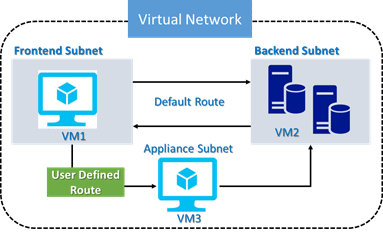
System routes subnets can communicate to other subnets present within the same virtual network.
Azure Route Tables, or User Defined Routing, allow you to create network routes so that your Firewall VM can handle the traffic both between your subnets and to the Internet. For the network interfaces to be allowed to receive and forward traffic, IP forwarding must be enabled.
Azure automatically routes traffic between Azure subnets, virtual networks, and on-premises networks. If you want to change any of Azure’s default routing, you do so by creating a routing table. If you’re new to routing in virtual networks, you can learn more about it in virtual network traffic routing.
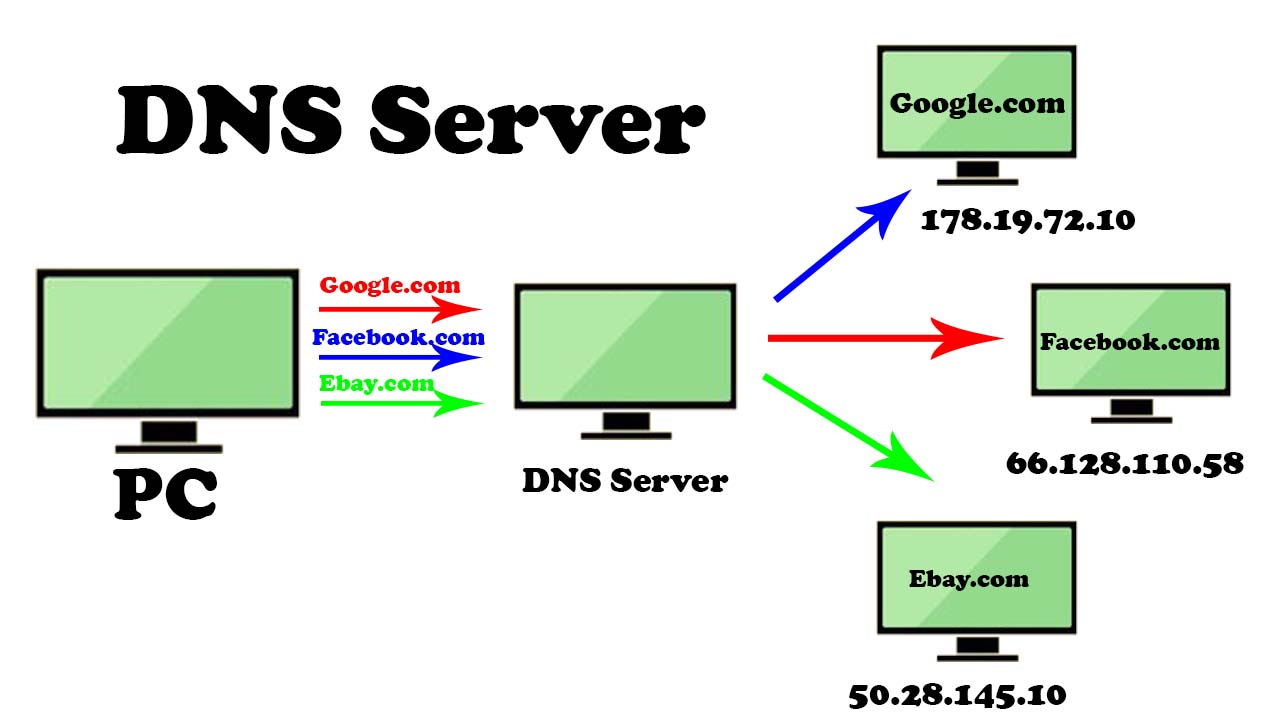
DNS is a service that translates the domain name into IP addresses. This allows the users of networks to utilize user-friendly names when looking for other hosts instead of remembering the IP addresses. The domain name used here is alphabetic and can be easily remembered.
For example, www.example.com is a domain name of a site. And with the help of DNS, it will get translated into its IP address 198.105.232.4.
A DNS system has its own network. If one DNS server does not know how to translate a particular domain name, it will ask another server, then another server, and so on, until they find out the correct IP address. A DNS server holds a list of all IP addresses along with their domain names, which can be retrieved when required.
Q10: What is an Azure Private DNS server?
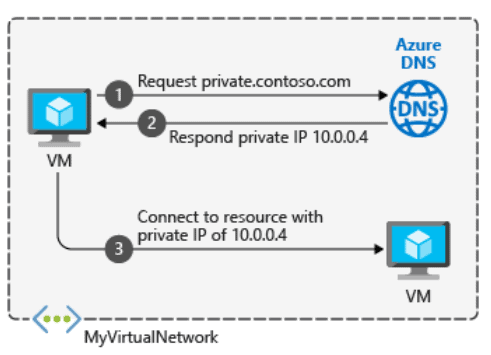
Ans:Azure Private DNS provides a reliable and secure DNS service for your virtual network. Azure Private DNS manages and resolves domain names in the virtual network without the need to configure a custom DNS solution.
By using private DNS zones, you can use your own custom domain name instead of the Azure-provided names during deployment. Using a custom domain name helps you tailor your virtual network architecture to best suit your organization’s needs.
A jump server,jump host, or jump box is a system on a network used to access and manage devices in a separate security zone. Used to securely access instances in the private subnets.
Q11: What is the advantage of a jump box VM?
Ans:Jump box prevents all Azure VM’s to expose to the public. We can do monitoring and logging on a single box. We can easily turn the ON/OFF remote desktop connectivity feature. By using the network security group, we can restrict the IP addresses to communicate with the Jump box.
Azure Bastion Host
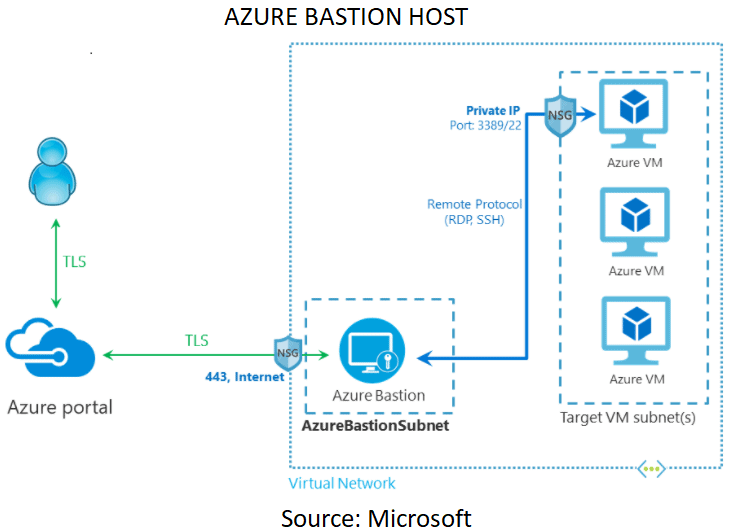
Azure Bastion is a fully platform-managed PaaS service that provides RDP/SSH over TLS(Transport Layer Security) i.e. port 443 to all the VMs in the network.
Azure Bastion is a managed Jump Box. It means that we can configure our Jump Box according to our needs. Remember, you cannot interact with it directly, but you can configure it. It supports both RDP (Remote Desktop Protocol) & SSH connections, and you can also play with its NSG (Network Security Group) to make your connection even more secure.
Q12: Bastion service is not free, correct?
Ans: Yes, it’s not a free service. It’s charged by the hour and for the amount of outbound data transfers involved, as described on Microsoft’s pricing page.
Q13: Can I deploy multiple Azure resources in my Azure Bastion subnet?
Ans: No. The Azure Bastion subnet (AzureBastionSubnet) is reserved only for the deployment of your Azure Bastion resource.
Azure Bastion deployment is per virtual network, not per subscription/account or virtual machine. Once you provision an Azure Bastion service in your virtual network, the RDP/SSH experience is available to all your VMs in the same virtual network.
Quiz Time (Sample Exam Questions)!
With our Microsoft Azure Administrator training program, we cover 150+ sample exam questions to help you prepare for the certification AZ-104.
Check out one of the questions and see if you can crack this…
Ques: Your company plans to migrate all its network resources to Azure. You need to start the planning process by exploring Azure. What should you create first?
A. Subscription
B. Resource group
C. Virtual network
D. Management group
The right answer will be revealed in my next week’s email.
Here is the answer to the question shared last week (Scroll down at the end of this post for the question).
Ques: I have some private servers on my premises, also I have distributed some of my workloads on the public cloud, what is this architecture called?
A. Virtual Private Network
B. Private Cloud
C. Virtual Private Cloud
D. Hybrid Cloud
Answer: D
Explanation: This type of architecture would be a hybrid cloud. Because we are using both, the public cloud, and on the premises servers. To make this hybrid architecture easy to use, wouldn’t it be better if your private and public cloud were all on the same network (virtually). This is established by including your public cloud servers in a virtual private cloud and connecting the virtual cloud with your on-premise servers using a VPN (Virtual Private Network).
Begin your journey toward Mastering Azure Cloud and landing high-paying jobs. Just click on the register now button on the below image to register for a Free Class on Mastering Azure Cloud: How to Build In-Demand Skills and Land High-Paying Jobs. This class will help you understand better, so you can choose the right career path and get a higher paying job.
I started my IT career in 2000 as an Oracle DBA/Apps DBA. The first few years were tough (<$100/month), with very little growth.
In 2004, I moved to the UK. After working really hard, I landed a job that paid me £2700 per month.
In February 2005, I saw a job that was £450 per day, which was nearly 4 times of my then salary.









![Microsoft Agentic AI Business Solutions Architect [AB-100] | K21 Academy](https://test.k21academy.com/wp-content/uploads/2025/11/Microsoft-Agentic-AI-Business-Solutions-Architect-AB-100-Exam-Overview1.png)


